Vendor Invoice and Payment Report
ExFlow | Inquiries and reports | ExFlow Vendor Invoice and Payment Report
Purpose
The Vendor Invoice and Payment Report provides a comprehensive view of invoices that have been processed and paid within the system.
This report has been specifically designed for Australian and New Zealand customers to support external Payment Time Reporting requirements. While it is not the final regulatory submission, it provides the essential invoice and payment data required to generate those reports.
The report includes invoice transactions from both ExFlow and Dynamics 365 Finance (D365), giving users visibility into key stages of the invoice process.
This includes important dates such as:
- Invoice/document date.
- Scanning (receipt) date.
- Payment (settlement) date.
In addition, the report displays relevant voucher details, along with the invoice amounts and paid amounts. Together, this information allows users to analyse the full lifecycle of an invoice, from initial receipt through processing and approval, to final payment.
Primary Uses of the Report
This report is primarily used to:
- Measure the number of days taken to receive, process, and pay invoices.
- Assess compliance with internal processes and external payment terms.
- Provide AU/NZ business units with the data required to support external Payment Time Reporting.
- Export invoice and payment data for further analysis, including filtering, charting, and custom reporting in Excel.
Pre-requisites
- ExFlow Version: 2.18.
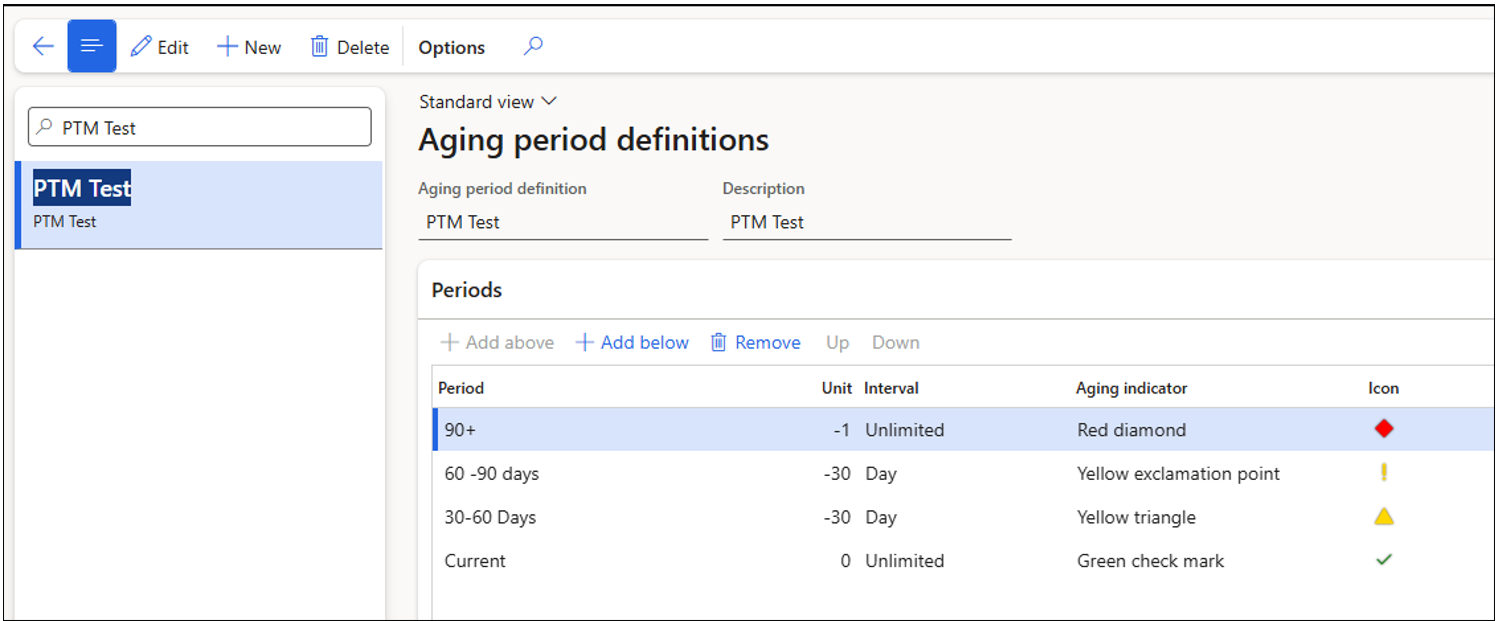
- Aging period definitions must be configured in D365 FO.
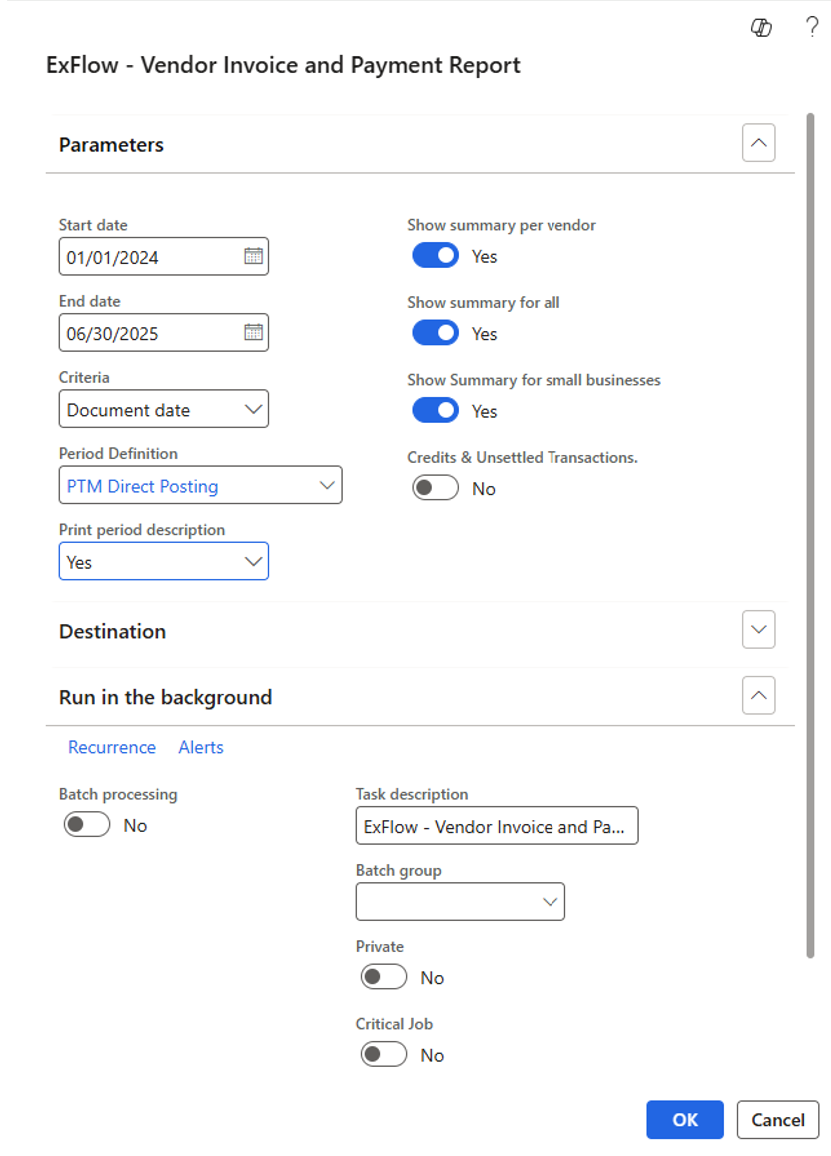
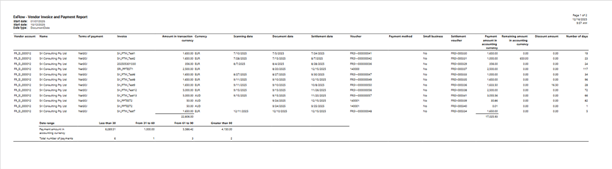
The screenshot below is for demonstration purposes only and is intended to help illustrate the example.
| Parameters | |
|---|---|
| Start Date | Filters documents from the selected date onwards. |
| End Date | Filters documents up to the selected date. |
| Criteria | Determines how the document is retrieved in the report: - Document Date > Uses invoice/document date. - Scanning Date > Uses the date the invoice was received into the OCR. |
| Period Definition | Select a D365 Aging period definition to group payments into buckets. |
| Print Period Description | - Yes > Displays period descriptions at the top of each column. - No > Hides period descriptions. |
| Show Summary per Vendor | Includes a summary section for each vendor showing the total payments and the total number of payments made within that range. |
| Show Summary for All | Includes a summary section at the end of the report for all vendors, showing the total payment amounts and the total number of payments made across all vendors for that period. |
| Show Summary for Small Business | Displays a summary of small business vendors/suppliers. Note: Vendor accounts must be flagged as small business. |
| Credit & Unsettled Transactions | Includes credit notes and unsettled invoices associated with the original invoice. Recommended to flag as No. |
Report Output Overview
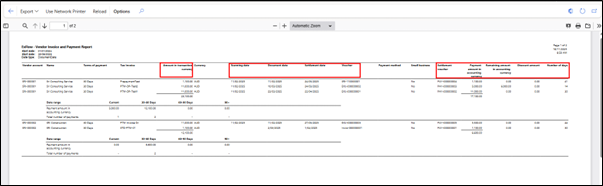
This report displays invoice and settlement data for processed and paid invoices.
Note: Unpaid transactions are not included in this report.
| Report Columns | |
|---|---|
| Amount in transaction Currency | Original document amount in the currency of the invoice. |
| Scanning Date | Date the document was registered in OCR. |
| Document Date | Invoice date from the document. |
| Settlement Date | Date the settlement voucher was posted in D365 FO. |
| Voucher | The associated voucher number for the document. |
| Small Business | Indicates whether the vendor is flagged as a small business (Yes/No). |
| Settlement Voucher | Settlement voucher number tied to the document. |
| Payment Amount in Accounting Currency | Settled Amount in the company's accounting currency. |
| Remaining Amount in Accounting Currency | Any outstanding balance (e.g., partial payments, manual discounts) in Accounting Currency. |
| Discount Amount | Discount applied based on vendor terms and automatically calculated discounts (Manual discounts are not included.) The discount amount is reflected in Accounting Currency. |
| Number of Days | Calculated based on the selected criteria: - If Document Date selected = Settlement Date - Document Date. If Scanning Date selected = Settlement Date - Scanning Date. |
Summary Section Overview
This section provides clarity on how the summary functionality behaves based on different configuration settings.
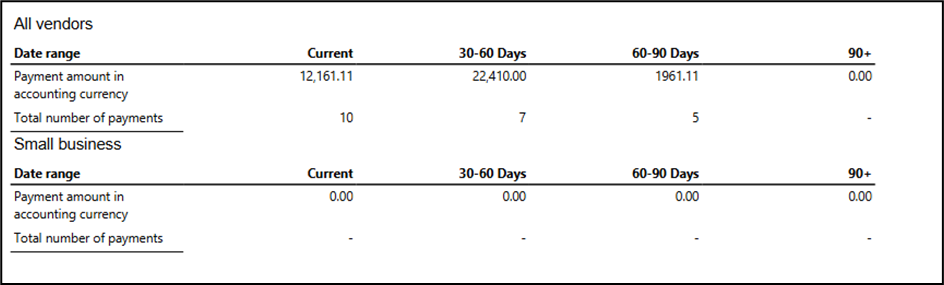
- When “Summary per Vendor” is Flagged as
Yes.- The system generates a separate summary for each vendor included in the statement.
- Each vendor’s payment transactions are grouped and displayed independently.

- When “Summary for All” and “Small Business” are Flagged as
Yes.- A consolidated summary is produced at the end of the report, combining all payment transactions into a single aggregated view.
- If the Small Business flag is also enabled, the summary specifically highlights or categorises small business vendors within the consolidated report.
- This configuration is useful for reviewing an overview of the total number of payments made across the date range for all vendors and small business vendors.
Export Options
Supported Export Formats:
- Excel
- Word
- CSV
- MHTML
- TIFF
Not Supported:
- XML format
Key Report Behaviours
-
Currency used for payment values.
All payment-related amounts, including “Payment amount in accounting currency”, “Remaining balance in accounting currency”, and “Discount amount”, are shown in the accounting currency.
This ensures consistency and standardised calculations in the payments (settlement). -
Multiple payments per invoice.
If an invoice is paid in multiple instalments, the report will display one line per payment.
For example, an invoice for EUR 1,650 paid in two instalments (EUR 1,000 and EUR 650) will appear as two separate lines in the report.
This is because the calculations are based on the individual payment (settlement) dates.
Note: Although multiple lines are shown, the “Sum of Amount in transaction currency” reflects the original invoice value only.

| Scenario | Scenario Description | Invoice Amount | What Appears in the Report |
|---|---|---|---|
| Sri_PTM_Test1 | Fully paid invoice | $1,650.00 | The invoice is fully paid and settled. It appears in the report as a completed payment. |
| Sri_PTM_Test2 | Partially paid invoice | $1,650.00 | Both the paid amount and the remaining balance are shown. Example: Paid $1,000, Remaining $650. |
| Sri_PTM_Test3 | Invoice approved but not yet paid | $1,650.00 | Unpaid invoices are not included in the report. |
| Sri_PTM_Test6 | Invoice with partial credit, and the remaining amount is settled | $1,650.00 | A credit note is applied to the transaction before payment. Only the actual paid amount is shown (e.g. $1,000). Credit amounts are not displayed, and the remaining balance shows as $0. |
| Sri_PTM_Test9 | Invoice with vendor discount applied | $1,650.00 | The discounted amount will be under the Discount column, example: Discount of $16.50. |
| Sri_PTM_Test10 | Invoice fully settled using a credit note | $1,650.00 | The invoice is fully settled using a credit note only. No cash payment is made, so the invoice does not appear in the report. |
| Sri_PTM_Test13 | Prepayment invoice with currency adjustment | $5,000 (AUD) | Multiple lines due to prepayments. Three lines appear: two prepayments and one final settlement (e.g. $30.66, $0.01, $3,055.56). Invoice is in AUD, and payments are in EUR. |
-
Amount in the transaction currency
The Amount in the transaction currency column displays the document amount exactly as submitted by the supplier, in the original transaction currency.
If invoices are issued in multiple currencies, the total shown may represent mixed currencies and may not be meaningful. In such cases, amounts must be converted externally into a single currency to obtain an accurate total for that supplier. -
Credit notes
Credit notes are included in the report if the credit notes are not allocated against the transactions, but rather allocated through the payment journal. -
Summary section
The summary sections provide a high-level overview only. They display the total payment amounts and the number of payments made.
Notes: This report is designed to act as a data source for external Payment Time Reporting requirements (Applicable to Australian and New Zealand customers).
It is not the final regulatory submission format but it provides the necessary underlying data to support that reporting.