Release 2.19.3
A new patch release of AP Automation (powered by ExFlow) has been released for the major release 2.19.
The release is named 2.19.3 and it includes corrections and some new functionality compared to the major release.
The main reasons for the patch are corrections and few updated functions in the Direct Posting process.
The release will be available on the LCS today.
Improvements
51340 We have extended Direct Posting to apply the header cash discount to the sales tax calculation in the same way as a manually created vendor invoice journal, including when the general ledger parameter Deduct cash discount before sales tax calculation is enabled. The cash discount amount is distributed across the invoice lines and carried into final posting.
55067 We have extended the final posting validation for Direct Posting so the total invoice amount can be validated, not only the sales tax amount. A new setup option for cost invoices and purchase order invoices lets you validate the sales tax difference, the total amount difference, both, or none, which catches invoices that would otherwise post with a total higher or lower than the scanned invoice.
55068 We have extended Direct Posting and introduced an Update posting date action in the Document form, so the posting date of an active invoice can be changed without sending the invoice back to the Import form while it is out for approval. The action sits behind its own menu item, recalculates due date, exchange rate and cash discount according to the setup, and is recorded in the timeline log.
More detailed information: https://docs.signupsoftware.com/finance-operations/docs/user-manual/whats-new-and-planned/release-notes
Package information
The latest package available via LCS are currently 2.19.3 This version is built on 10.0.47 and that’s the lowest version it can be installed on.
This version is tested and compatible with 10.0.48
More information:
https://docs.signupsoftware.com/finance-operations/docs/user-manual/solution-management/exflow-lcs-solution
Release 2.19.1
A new version of AP Automation (powered by ExFlow) for Microsoft Dynamics 365 for Finance and Operations has been released as of June 2026.
Corrections
54973 We have updated the table index on table EXF_tImportDocumentTransfer that caused database synchronization error depending on special conditions.
https://docs.signupsoftware.com/finance-operations/docs/user-manual/whats-new-and-planned/release-notes
Package information
The latest package available via LCS are currently 2.19.1 This version is built on 10.0.47 and that’s the lowest version it can be installed on.
This version is tested and compatible with 10.0.48
More information:
https://docs.signupsoftware.com/finance-operations/docs/user-manual/solution-management/exflow-lcs-solution
Major Release 2.19.0
A new version of AP Automation (powered by ExFlow) for Microsoft Dynamics 365 for Finance and Operations has been released as of June 2026.
- AI
- Official release of TruvioSense Coding & Approval
- New onboarding process disconnected from Azure Marketplace for AP related functions. (E-invoicing is still connected to Marketplace)
- Official release of TruvioSense Coding & Approval
- New Roles, duties and privileges
- We have created new ExFlow roles, duties and privileges to make it easier to configure new roles and better out of box roles. Please review the documentation on how to adapt these new roles. (16087, 52555)
- Direct posting process
- Support for Prepayments.
- Deferrals for Procurement categories and Projects.
- Possibility to post Project and Fixed Assets lines with a Procurement Category against Pending vendor invoices.
- Support for Prepayments.
- Performance
- Multi threaded final posting jobs.
- Working with ExFlow Web Async (Web version to be communicated).
- Multi threaded final posting jobs.
- Sales Tax Framework
- Sales tax framework now supports gross amount entry on invoices.(48234)
- Sales tax framework now supports gross amount entry on invoices.(48234)
- Import form Excel
- We have made it possible to import from Excel in Approval and Document Form. (7981)
- We have made it possible to export and import lines. (19326)
- It is now possible to import lines of type Item and Charges. (21422)
- We have made it possible to mix line types during the import and export. (29141)
- We have added the purchase price and quantity as options to use in the file. (51502)
- We have made it possible to import from Excel in Approval and Document Form. (7981)
- Vendor statement
- As part of this release, we have made several changes and added more functionality into the vendor statement functionality. (53143, 53163, 53326, 54231, 54232)
- As part of this release, we have made several changes and added more functionality into the vendor statement functionality. (53143, 53163, 53326, 54231, 54232)
- KSeF UUID
- We have made it possible to transfer the KSeF UUID from the ExFlow document to posted invoices during the final posting process. (52601)
- We have made it possible to transfer the KSeF UUID from the ExFlow document to posted invoices during the final posting process. (52601)
Package information
The latest package available via LCS are currently 2.19.0. This version is built on 10.0.47 and that’s the lowest version it can be installed on. This version is tested and compatible with 10.0.48
More information: https://docs.signupsoftware.com/finance-operations/docs/user-manual/solution-management/exflow-lcs-solution
Important upgrade Consideration for ExFlow AP 2.19
Version 2.19 introduces support for handling gross amounts on invoice lines.
As part of the upgrade, certain customers should review the configuration of the Approval Journal used by ExFlow.
This applies to customers who:
- Use the Invoice Register process.
- Deduct tax during invoice register posting.
- Have not activated Sales tax group and Item sales tax group in ExFlow configuration (no sales tax setup/calculation on lines).
This tax setup is commonly used in Sweden and some other countries.
Required Verification
In order to continue with net line amount in ExFlow, the Approval Journal configured in ExFlow Parameters should use a journal name where the following setting is configured:
- Navigate to Accounts payable -> Setup -> Journals -> Journal names
- make sure that Amount incl. tax =
No
Why is this important? Version 2.19 introduces support for gross amounts on invoice lines. As a result, the Amount incl. tax setting on the journal used as the ExFlow Approval Journal controls if net or gross amounts on lines are used.
Action Required
When upgrading to ExFlow AP 2.19, customers using the Invoice Register process and the setup described above should verify the Amount incl. tax setting on the journal configured as the Approval Journal in ExFlow Parameters.
If the setting is currently Yes, it should be changed to No to ensure that ExFlow uses net amount on lines as in earlier versions of ExFlow.
Please notice! that Invoice register journal used by ExFlow, should always be setup with Amount incl. tax = Yes." ________________________________________________________________________________________________________________________-
IMPORTANT INFORMATION
Upgraded SFTP library (SSH.NET) – new ciphers and encryption
(38773, 53200)
We have upgraded the SSH.NET (Renci) library used by ExFlow AP for SFTP-based
import methods, moving from version 2020.0.2 to 2024.1.0. The upgrade adds support
for modern ciphers and encryption, removes deprecated algorithms, and includes
fixes for known vulnerabilities.
What this means for you
If you import invoices over SFTP, ExFlow AP can now negotiate stronger, more modern encryption with your SFTP server. A few legacy algorithms have also been removed, so in rare cases a server that only offers an older algorithm may need to be configured to use a current one. We recommend regression testing your SFTP import methods after upgrading.
New ciphers, encryption and algorithms (2023.0.0 – 2024.1.0)
- Support for
aes*-gcm@openssh.comcipher algorithms (on .NET 6+). - Support for the
zlib@openssh.comcompression algorithm (on .NET 6+). - New Encrypt-then-MAC (ETM) message authentication algorithms:
hmac-sha2-256-etm@openssh.comhmac-sha2-512-etm@openssh.comhmac-sha1-etm@openssh.comhmac-sha1-96-etm@openssh.comhmac-md5-etm@openssh.comhmac-md5-96-etm@openssh.com
- Support for RSA-SHA256/512 signature algorithms.
- Support for parsing OpenSSH keys with ECDSA 256/384/521 and RSA.
- Support for SHA256 and MD5 fingerprints for host key validation.
Removed / breaking for SFTP negotiation
- The legacy MAC algorithms
hmac-ripemd160andhmac-ripemd160@openssh.comhave been dropped. If your SFTP server relies on these, configure it to use one of the supported algorithms above.
A note on shared library versions on Dynamics 365 F&O
ExFlow AP runs inside the shared Dynamics 365 Finance & Operations application, together with Microsoft's components and any other ISV add-ons installed in the same environment. Third-party libraries such as SSH.NET — and the BouncyCastle.Cryptography library it depends on are loaded into this shared runtime. When two solutions reference different versions of the same library, only one version can be loaded at runtime, which can lead to version-mismatch errors for one or both solutions.
Why we stop at 2024.1.0
Version 2024.1.0 gives us the new ciphers, encryption and vulnerability fixes while keeping a controlled, compatible BouncyCastle.Cryptography dependency. Later SSH.NET versions (from 2024.2.0) change how cryptography and key exchange are handled and depend on BouncyCastle.Cryptography 2.4.0. Adopting that version on the shared F&O platform increases the risk of a version conflict with other ISV solutions, so we have deliberately pinned to 2024.1.0 to balance security improvements with platform stability.
Deploying ExFlow AP into a Finance & Operations UDE (PPAC)
ExFlow AP for Dynamics 365 Finance & Operations is currently delivered as a Lifecycle Services (LCS) deployable package — the ZIP you would normally upload to the LCS asset library. With customers moving to environments managed through the Power Platform Admin Center (PPAC), that legacy package format cannot be deployed directly: PPAC‑managed Unified Developer Environments (UDE) require a Power Platform unified package.
Until ExFlow ships a unified package out of the box, this guide shows how to get from
the ExFlow deployable package to a unified package, and how to deploy it to a UDE —
using both ModelUtil.exe and Azure DevOps pipelines.
For more guidance see: https://docs.signupsoftware.com/finance-operations/docs/user-manual/solution-management/PPAC
Major Release 2.18.0
A new version of ExFlow AP for Microsoft Dynamics 365 for Finance and Operations has been released as of January 2026
- AI
- Extended the Predictions functionality to have an easier setup of vendors but also made it possible to apply predictions upon import of invoice. (44514)
- Extended the Predictions functionality to have an easier setup of vendors but also made it possible to apply predictions upon import of invoice. (44514)
- Workflow
- Implemented support to suggest approvers based on destination company for intercompany invoices. (7384)
- Implemented support to suggest approvers based on destination company for intercompany invoices. (7384)
- Sales Tax
- Support for Universal Tax Rate API in combination with Vertex. (39774)
- Support for Universal Tax Rate API in combination with Vertex. (39774)
- Agreements
- Redesign of the Agreements form to get a better overview and align the layout with standard F&0. (45583)
- Created new forms, roles, and workspace extensions to make it easier to work with agreements from an agreement responsible and approval view. (39619)
- Redesign of the Agreements form to get a better overview and align the layout with standard F&0. (45583)
- UX
- Updated the layouts for the Import form and Document form list pages and in edit mode to increase the performance and remove fields from the default view. (40215)
- Updated the layouts for the Import form and Document form list pages and in edit mode to increase the performance and remove fields from the default view. (40215)
Package information
The latest package available via LCS are currently 2.18.0. This version is built on 10.0.45 and that’s the lowest version it can be installed on. This version is tested and compatible with 10.0.45
More information: https://docs.signupsoftware.com/finance-operations/docs/user-manual/solution-management/exflow-lcs-solution
Release 2.17.4
Released as of October 2025, see more information about the details under "Release notes".
The release is named 2.17.4 and it includes corrections and new functionality compared to the major release.
The main reason for the patch is primarily additions of functionality requested by clients moving from Axtension Invoice Processing to ExFlow AP.
Important topics included in this release
- 48521 Possibility to configure which journal to use for final posting based on different criteria in combination with Direct posting.
- 48901 Support for Payment Workflow in combination with Direct posting.
- 49100 Deferrals to Purchase order invoices and deferral rules for purchase orders.
Package information
The latest package available via LCS are currently 2.17.4. This version is built on 10.0.43 and that’s the lowest version it can be installed on.
This version is tested and compatible with 10.0.44 and 10.0.45
More information: https://docs.signupsoftware.com/finance-operations/docs/user-manual/solution-management/exflow-lcs-solution
What´s new website
Release 2.17.2
Released as of August 2025, see more information about the details under "Release notes". The release is named 2.17.2 and it includes corrections and new functionality compared to the major release.
The main reason for the patch is primarily corrections that have been identified since the major release. The patch is not related to the earlier communicated issue with blob storage.
Two new functions included in this release
- 45831 We have migrated the logic from the PO Reconnect Power App but it will require a new release of ExFlow Web.
- 48608 We have made it possible to activate the Vendor Statement functionality with a license key instead of purchasing through Azure marketplace.
Package information
The latest package available via LCS are currently 2.17.2. This version is built on 10.0.43 and that’s the lowest version it can be installed on. This version is tested and compatible with 10.0.44 and 10.0.45
More information: https://docs.signupsoftware.com/finance-operations/docs/user-manual/solution-management/exflow-lcs-solution
Important Update: Azure Blob Storage access Issue on Specific Platform Builds
Update
Dear Customers and Partners,
We’d like to share an important update regarding the critical issue affecting several add-on solutions for Dynamics 365 Finance and Operations (D365FO) related to Azure Blob Storage access.
Microsoft has confirmed this was caused by an error during the rollout of application version 10.0.44.
A fix is now available: Quality Update 76, which can be applied via Lifecycle Services (LCS) to resolve the issue.
This fix will also be included in the upcoming release:
Build: 10.0.2263.76
Platform: 7.0.7606.112
Please note: No new package for ExFlow is required to address this issue.
Thank you for your continued trust and collaboration.
Dear Customers and Partners
We would like to inform you about a recent critical issue observed in multiple add-on solutions for D365FO in relation to Azure Blob Storage access. The issue appears in some of our environment as Microsoft has begun removing legacy DLLs.
Issue
We recently encountered a recurring issue related to Azure Blob Storage access in our environments. The problem is manifested inconsistently — only affecting certain environments and AOS servers.
Several customers for our portfolios; Exflow and Axtension also reported similar behavior. Out of 9 customers currently running on 10.0.44 with AXTip, only 3 experienced the issue, with others unaffected. The inconsistency appears to be related to differences in AOS server behavior.
At this moment, we have not received any support cases from our ExFlow customers, but we expect that customers who upgrade to application version 10.0.44. will get this issue if they are using an external Azure blob storage.
Root Cause
Our investigation in our product portfolio has revealed that the problem is due to a version mismatch between the Azure.Storage.Blobs .NET assembly used in runtime and the version used when compiling models that access it due to that Microsoft has begun removing legacy DLLs.
Specifically:
• The system uses Azure.Storage.Blobs version 12.2300 at runtime.
• Some models, such as our AXTplatform (responsible for Azure storage access), were **built against version 12.2000 **of the same assembly.
This version mismatch can cause compatibility issues and runtime failures. We confirmed this behavior after updating a development machine to 10.0.44, where the issue appeared immediately — but disappeared after rebuilding the AXTplatform model on the same version.
This suggests a break in backward compatibility introduced in 10.0.44, particularly when models built on older platform versions interact with updated assemblies at runtime.
For both ExFlow AP and Invoice processing, we expect that some customer will have issues if they;
- Import invoices located on a Azure blob storage
- Generate invoice images from invoice xml by using an external blob storage.
Solution and Next Steps
To mitigate and resolve the issue:
-
For Axtension, we have rebuilt the AXTplatform model using a build server running application version 10.0.44.
- Our internal environments for the Axtension portfolio, when updated and rebuilt on 10.0.44, have no longer shown the issue.
- We are also exploring whether it is possible to work around the issue without rebuilding, but current evidence suggests rebuilding on the latest version is the most reliable solution.
-
For ExFlow, we are investigating the possibility to rebuild our 2 latest releases to version 10.0.44.
- In parallel creating a functionality to access azure blob storage with a connection string instead of using storage account name and key.
- Recommendation to our customers it not to upgrade to MS platform version 10.0.44. until the issue are resolved and new packages are available through the LCS if needed. If no new packages are needed, it will be communicated here on the Documentation platform.
We will continue to monitor the situation and coordinate with impacted partners. If you suspect similar issues in your environment, or if you are running mixed model build versions, please reach out to us via our support portal.
https://support.signupsoftware.com
Thank you for your continued trust and collaboration.
Major Release 2.17.0
A new version of ExFlow AP for Microsoft Dynamics 365 for Finance and Operations has been released as of June 2025
Release topics!
Direct posting process
We have as part of this release added support for the below functions in direct posting process.
28210 We have extended the lookup for Pay when Paid terms to work with ExFlow journal structures and correctly identify whether Pay when paid is active.
32919 We have made it possible to add deferral information in ExFlow to be used when posting approval journals. Limited to Direct posting, straight-line templates and line type Ledger.
ExFlow CO2 insights – Atmoz Sustainability reporting
40916 We have added support to integrate with an external sustainability reporting tool: Atmoz.
Related tickets: 46003, 46791, 47692
Financial Tags
41096 We have made it possible to add and use financial tags in ExFlow to be used when posting approval journals.
Payment Workflow
44148 We have introduced a new workflow that can be triggered after the invoice is finally posted, to have an extra approval step prior to the invoice being available for payment.
Limited to approvals within F&O.
Package information
The latest package available via LCS are currently 2.17.0. This version is built on 10.0.43 and that’s the lowest version it can be installed on. This version is tested and compatible with 10.0.42 and 10.0.43
More information: https://docs.signupsoftware.com/finance-operations/docs/user-manual/solution-management/exflow-lcs-solution
Urgent error during import of Peppol invoices
Issue
After upgrade to 2.16.4 - Peppol invoices gets a faulty invoice image when delivery node is missing in XML. Reported bug id: 47812
Root cause
After investigation we can see that when the delivery node is missing, the invoice image gets squeezed to either the left or right side of the image.
Solution
Correction of the code will be included in the R1 2025 release in the beginning of June.
Quick work around - upload new file to import methods
- ExFlow AP - Go to the import methods
- Find the method - select general and XSLT repository
- Mark the one for Peppol_Bis_bill
- Select "Edit"
- Clean/delete the already uploaded information
- Upload the new file found under Peppol https://docs.signupsoftware.com/finance-operations/docs/user-manual/import-methods/import-files-to-download
- Press OK.
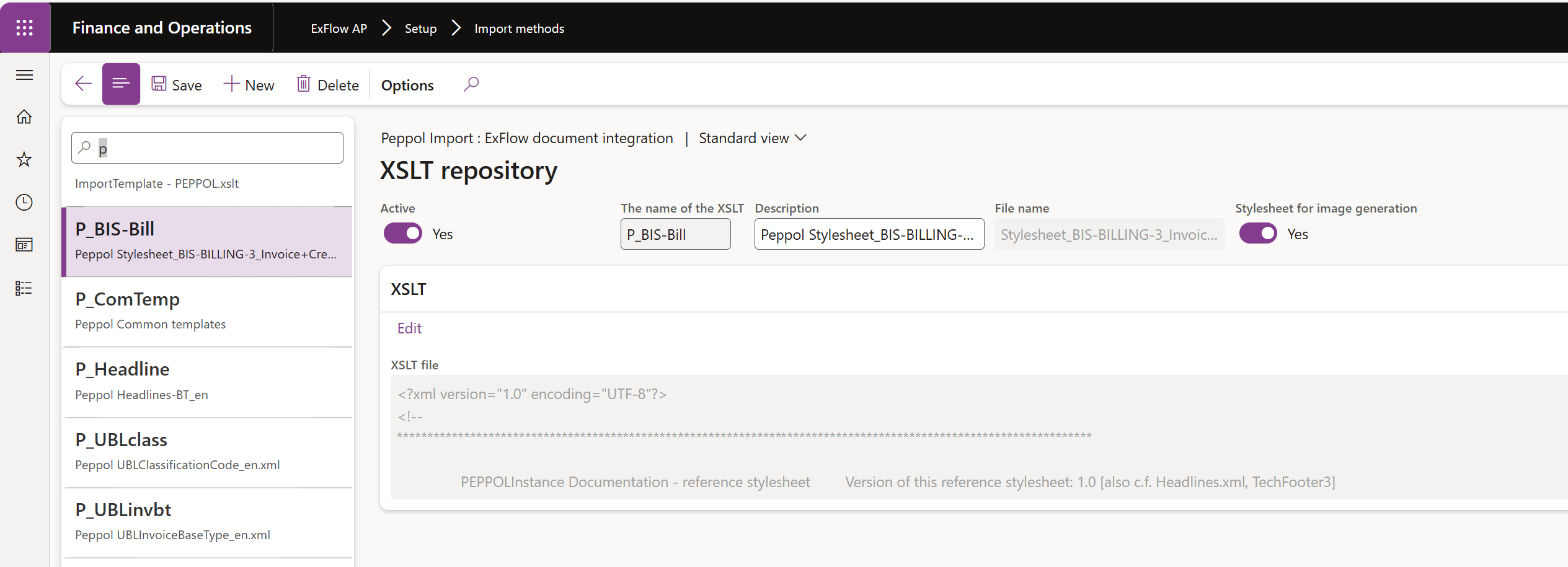
Urgent Invoice Import Error
Issue
Customers may encounter an error when importing invoices into the Import form, similar to the error message shown below:
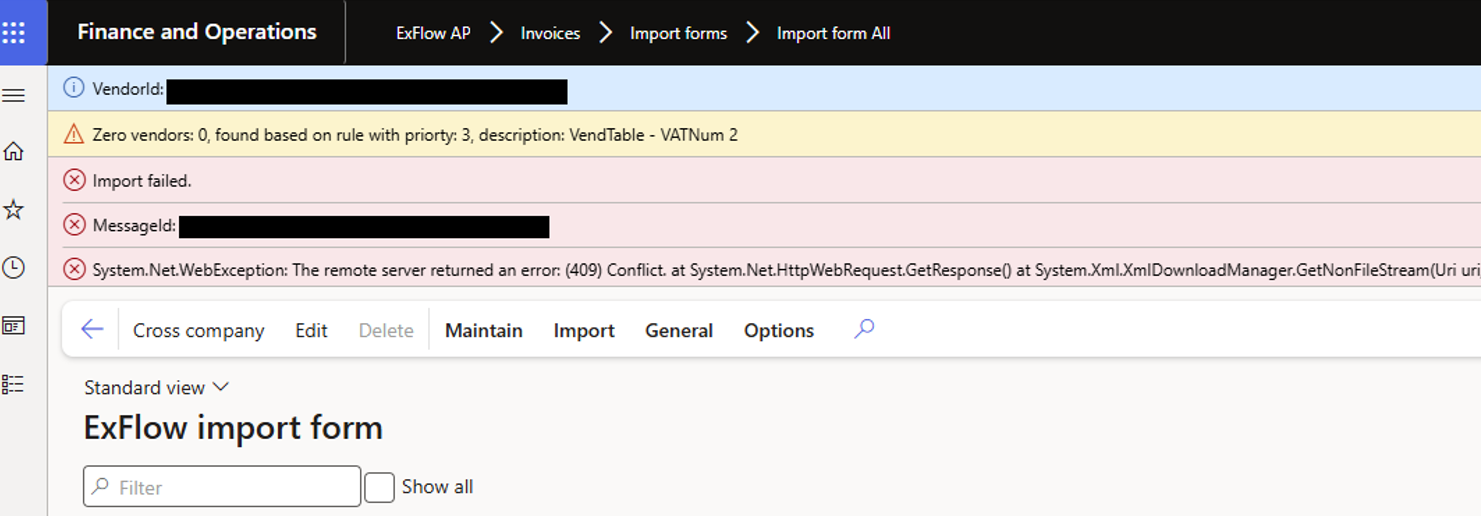
Root cause
Microsoft has done a policy change related to blob storage. These changes were previously communicated in the ‘Important notice’ (linked at the end of this message). While these changes are not necessarily tied to a specific update of D365FO, Microsoft stated that they would be effective from at least version 10.0.43. However, Microsoft has done this policy change depending on regions from the 21st to 28th March (Finance and Operations Apps – Account key access for your storage account to be disabled).
The issue occurs when importing invoices into the ExFlow Import form without an embedded invoice image in the XML file. Invoices imported using ExFlow Data Capture or other Import methods where an invoice image is always included with the invoice will not result in an error.
Solution
There are 2 possible solutions:
- Update ExFlow to version 2.16.3 or later.
- Question: Are additional steps required if clients choose to update?
- For ExFlow version 2.14.4 or later, it is possible to add a blob storage without requiring an update to ExFlow. However, as the ‘Important notice’ covers other Microsoft-related changes, all clients using blob storage should update ExFlow to at least version 2.16.2 when upgrading to D365FO version 10.0.43 or newer.
- Create blob storage to support ExFlow when generating images for invoices lacking an embedded invoice image (commonly seen for e-invoices such as OIOUBL and PEPPOL). When creating the storage, set the access level to ‘Anonymous read access for containers and blobs’
- After creating the blob storage, configure it in ExFlow via: ExFlow AP - Setup - General parameters - PDF Web service
The provided screenshot is from the Truvio D365FO environment with ExFlow version 2.16.4. Label names may vary depending on version.
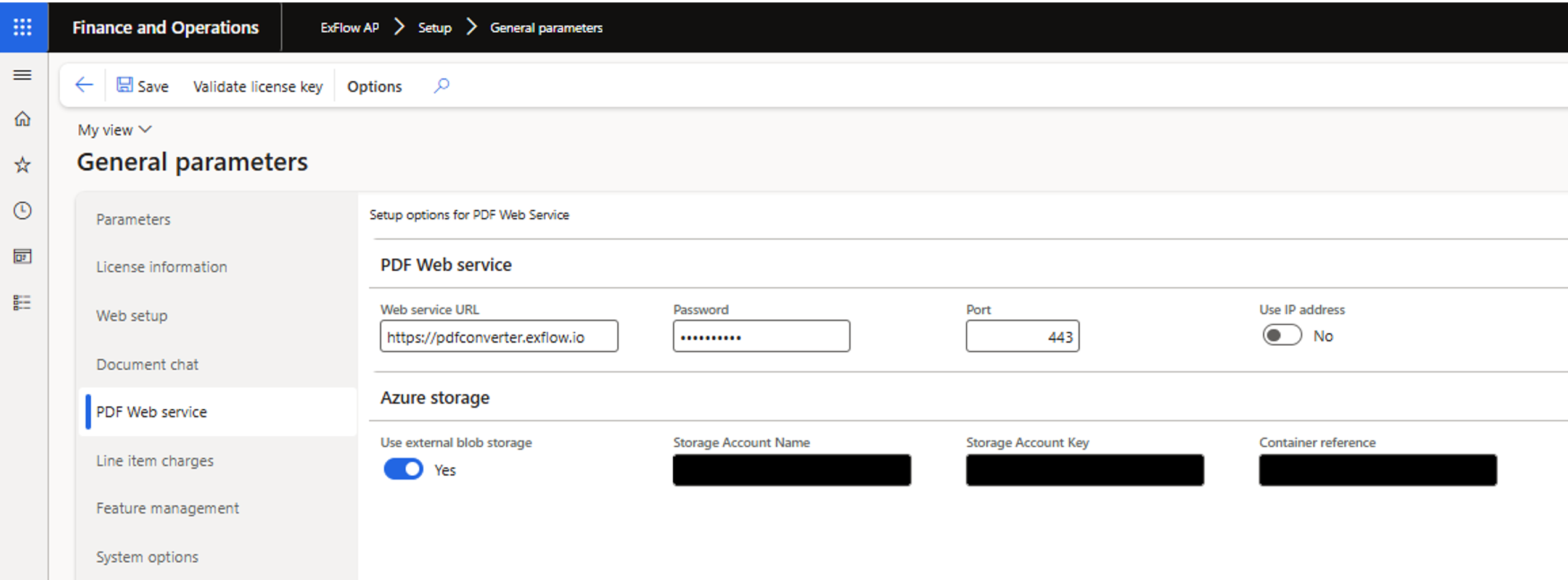
Additional Information from the Doc. Platform: https://docs.signupsoftware.com/finance-operations/docs/user-manual/whats-new-and-planned/news#for-customers-generating-pdf-images
Important to notice is that we only upload the stylesheets and not the actual invoice xml. When we generate the invoice images all files must be possible to resolve based on a URL link to the blob storage. In order to achieve this we are using the .NET class System.Xml.XmlUrlResolver. This class are not able to resolve the references unless the Container access level is set to Public.
This information was previously distributed via newsletter and also posted on docs.signupsoftware.com: https://docs.signupsoftware.com/https://docs.signupsoftware.com/finance-operations/docs/user-manual/whats-new-and-planned/news#important-notice-microsoft-critical-change---please-read
Release 2.16.4
Released in March 2025, see more information about the details under "Release notes". The reason for the patch is primarily the performance issue that was reported a couple of weeks ago.
- 46133 Due to a change in lookup of records that was created in 2.16, we had scenarios that caused extensive queries that potentially could cause an AOS crash.
Package information
The latest package available via LCS are currently 2.16.4. This version is built on 10.0.41 and that’s the lowest version it can be installed on. This version is tested and compatible with 10.0.42 and 10.0.43
More information: https://docs.signupsoftware.com/finance-operations/docs/user-manual/solution-management/exflow-lcs-solution
Release 2.16.2
Released in February 2025, see more information about the details under "Release notes". The reason for the patch is primarily the deprecation of blob storage libraries that we have used within ExFlow AP.
• 42938 Migration of azure blob libraries to Azure.Storage.Blob
More information about the change from Microsoft: https://learn.microsoft.com/en-us/dynamics365/fin-ops-core/fin-ops/get-started/removed-deprecated-features-platform-updates#migration-from-deprecated-libraries--windowsazurestorage-and-microsoftazurestorage-to-azurestorageblobs
Package information
The latest package available via LCS are currently 2.16.2. This version is built on 10.0.41 and that’s the lowest version it can be installed on. This version is tested and compatible with 10.0.42 and 10.0.43
More information: https://docs.signupsoftware.com/finance-operations/docs/user-manual/solution-management/exflow-lcs-solution
IMPORTANT NOTICE MICROSOFT CRITICAL CHANGE - PLEASE READ
With the new Dynamics 365 Finance and Operation release 10.0.43 from Microsoft there are breaking changes that is affecting ExFlow AP. The changes included from Microsoft is affecting the libraries that are used to work with Azure blob storages, but also accessing the internal blob storage that is provided with F&O.
Who is affected by the change?
Clients that are using the below functionalities in ExFlow AP.
- Generate PDF invoice images based on stylesheets. This functionality is used by clients that are importing EDI invoices such as OIOUBL, PEPPOL and EHF that doesn’t include an invoice image.
- Import of invoices from Azure blob storage. Other import methods such as FTP/SFTP or EDC are not affected.
- Access to invoice image from the PowerApp PO Reconnect (will not be solved with updates in FO).
- Customer who uses the new Auto credit/debit functionality. https://docs.signupsoftware.com/finance-operations/docs/user-manual/accounts-payable-process/auto-create-debit-credit
When will the change happen?
The change is implemented from Microsoft with 10.0.43 that was released for Preview on January 27th and will be have a general availability from March 14th. However, it is important to keep in mind that this may happen sooner if Microsoft releases the change as a quality update.
The blocking of Connection-String access can potentially be backported from Microsoft.
Actual changes
- Disable storage account key access to F&O managed storage account. https://learn.microsoft.com/en-us/dynamics365/fin-ops-core/fin-ops/get-started/removed-deprecated-features-platform-updates#disable-storage-account-key-access-to-finance-and-operations-managed-storage-accounts
Solution?
Truvio will in the beginning of February create a new version of ExFlow AP that will be available on the LCS for download. For customers generating PDF images, please see the below instructions.
The new release will be based on our latest major release 2.16.0 released in December 2024.
For customers generating PDF images
General Parameters
You first need to configure the PDF webservice for ExFlow AP. The configuration is
handled in the ExFlow form General Parameters.
PDF WEB SERVICE
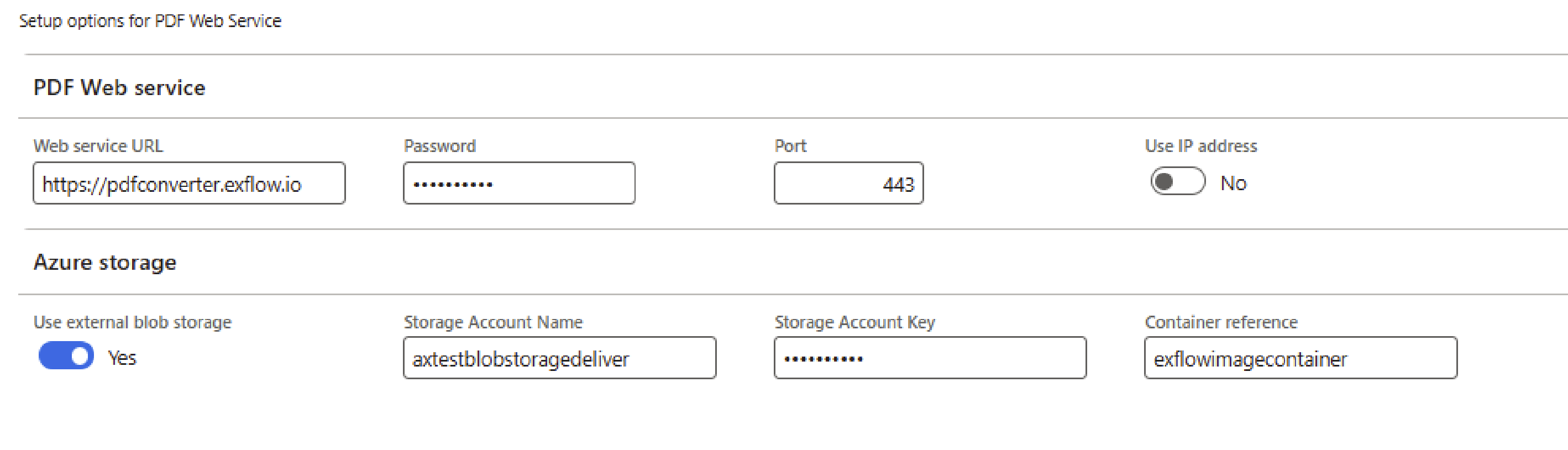
The service is hosted by Truvio.
- Web service URL: https://pdfconverter.exflow.io
- Password: Upon request
- Port: 443
- Use UP address: No
AZURE STORAGE
The security setting on the Container needs to be marked as Public (Public read access for blobs only). The reason for this is that many of the stylesheets that are used often
contains of multiple files to generate images. In these scenarios, some of the files usually have references to one or more of the other files.
Previously we have used the internal Blob storage for FO, but that is no longer possible due to security changes by Microsoft in 10.0.43.
Important to notice is that we only upload the stylesheets and not the actual invoice xml. When we generate the invoice images all files must be possible to resolve based on a
URL link to the blob storage.
In order to achieve this we are using the .NET class System.Xml.XmlUrlResolver. This class are not able to resolve the references unless the Container access level is set to Public.
EXTERNAL BLOB STORAGE
- Use external blob storage: Yes
- Storage Account Name: YourStorageAccount
- Storage Account Key: YourStorageAccountKey
- Container reference: YourStorageContainer
Release ExFlow 2.16.1
Released in January 2025, see more information about the details under "Release notes".
Major Release 2.16.0
A new version of ExFlow AP for Microsoft Dynamics 365 for Finance and Operations has been released as of December 2024.
This document outlines the key enhancements, corrections, and improvements featured in this major update. This release includes our new subscription module, released in ExFlow AP 2.14, enabling users to conveniently purchase functionality subscriptions directly from the Azure Marketplace.
Release topics!
Direct postings
We have added support in ExFlow AP to post invoices directly against Pending Vendor Invoices and Invoice Journal. This removes the pre-requirement to setup and work with the invoice register process inside F&O.
TMS Freight Bill
We have added support for Freight invoices that can be processed through Transportation Management.
TMS is dependent on the new Direct posting functionality.
Procurement categories – matching tolerances
We have extended the matching tolerances that exists in F&O and added tolerances when working with Procurement Categories like the ones that exists for Items.
Release ExFlow 2.15.4
Released in October 2024, see more information about the details under "Release notes".
Release ExFlow 2.15.1
Released in July 2024, see more information about the details under "Release notes".
Major Release ExFlow 2.15.0
A new version of ExFlow for Microsoft Dynamics 365 for Finance and Operations has been released as of June 2024.
This document outlines the key enhancements, corrections, and improvements featured in this major update. This release includes our new subscription module, released in ExFlow 2.14, enabling users to conveniently purchase functionality subscriptions directly from the Azure Marketplace.
Release topics!
Sales tax handling
30034 We have made a framework on how and when line tax calculations in ExFlow lines are being performed. Calculations can now be performed both based on request and/or immediately as before. All amounts and values received from the calculations are now stored for later use.
Note: The values presented on the header in Import form is not affected by this change. The framework is only affecting the tax values on lines in ExFlow. It does not affect the posted values at Invoice register or Invoice approval.
36134 Based on the above framework for line tax we have also introduced support for Tax Calculation Service.
Note: In this version it’s not supported with:
- Multiple VAT numbers
- Currency exchange types
- Certain Use Tax and reverse charge scenarios
- Override sales tax
38603 The framework contains a pre-defined list of fields that should trigger tax calculations, but it is also adjustable with a setup called Tax calculation influence fields.
Vendor Balance Statement
35002 We have added a new functionality to manage import and reconciliation of Vendor statements. This functionality is controlled by our subscription module mentioned in the introduction text.
Workflows
As part of the release, we have made several changes and added more fields to use in the workflow conditions.
20275 We have added the invoice line amount in the accounting and reporting currencies to all workflows.
23315 We have made it possible in the Import validation workflow to compare dates with a relative comparison such as is on or before.
30414 We have added a new position hierarchy that makes it possible to create positions and assign it to User groups and Security roles. The change also includes a new possibility to configure a financial dimension owner as an ExFlow owner which can include Workers, User group or Security roles.
Approval object and Advanced workflow
35714 We have redesigned how the rules and settings for the advanced workflow are being configured, evaluated and executed. This also required us to rebuild major parts of how the approval logic from ExFlow Web and My Vendor Invoices is being performed.
The new logic is restricted to a new feature parameter named Approver workflow, located at ExFlow AP-> General parameters -> Feature management.
26889 We have rebuilt the job Auto match invoice on arrival of goods. The new version of the job is dependent on 35714.
The new position hierarchy is only available in ExFlow.
35488 We have added the invoice amount in the accounting currency to ExFlow Advance Approval Workflow Type and the ExFlow post control rules V2.
35610 We have added the Project Group for the project on the connected purchase order line to all workflows.
See more information about the details for 2.15.0. under "Release notes".* https://docs.signupsoftware.com/finance-operations/docs/user-manual/whats-new-and-planned/release-notes
Release ExFlow 2.14.2
Released in March 2024, see more information about the details under "Release notes".
Release ExFlow 2.14.1
Released in february 2024, see more information about the details under "Release notes".
Major Release ExFlow 2.14
Release Topics:
28037 Auto create debit and credit invoices
We have added a new functionality that automates the creation of both debit and credit invoices for previously posted invoices. This enhancement streamlines the correction process for erroneous postings in cost invoices, providing a more efficient management solution.
34514 Support for Po matching detalis and variance amounts
It is now possible to view the detailed matching results in ExFlow. These results are stored for versatile use in all workflows. Additionally, within this feature, the signing limit concept has been extended to allow the specification of different signing limits for variance amounts.
33652 Possible to set the posting date based on specific business needs
We have enhanced configurability by enabling users to set the posting date based on specific business needs. This update offers greater flexibility in tailoring the system to align with individual business requirements.
7511 Post control when coding is changed
The ExFlow Post Control rules v2 workflow can now be configured to halt only when there is a change in coding.
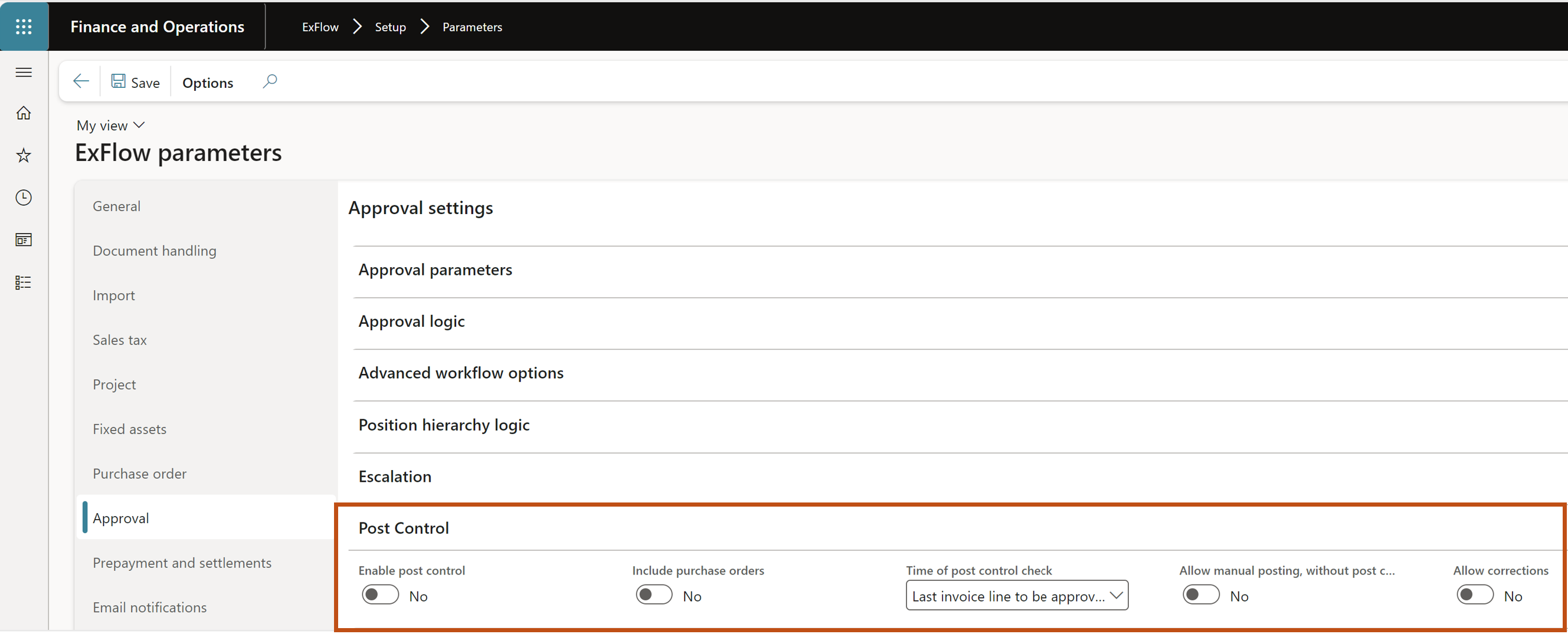
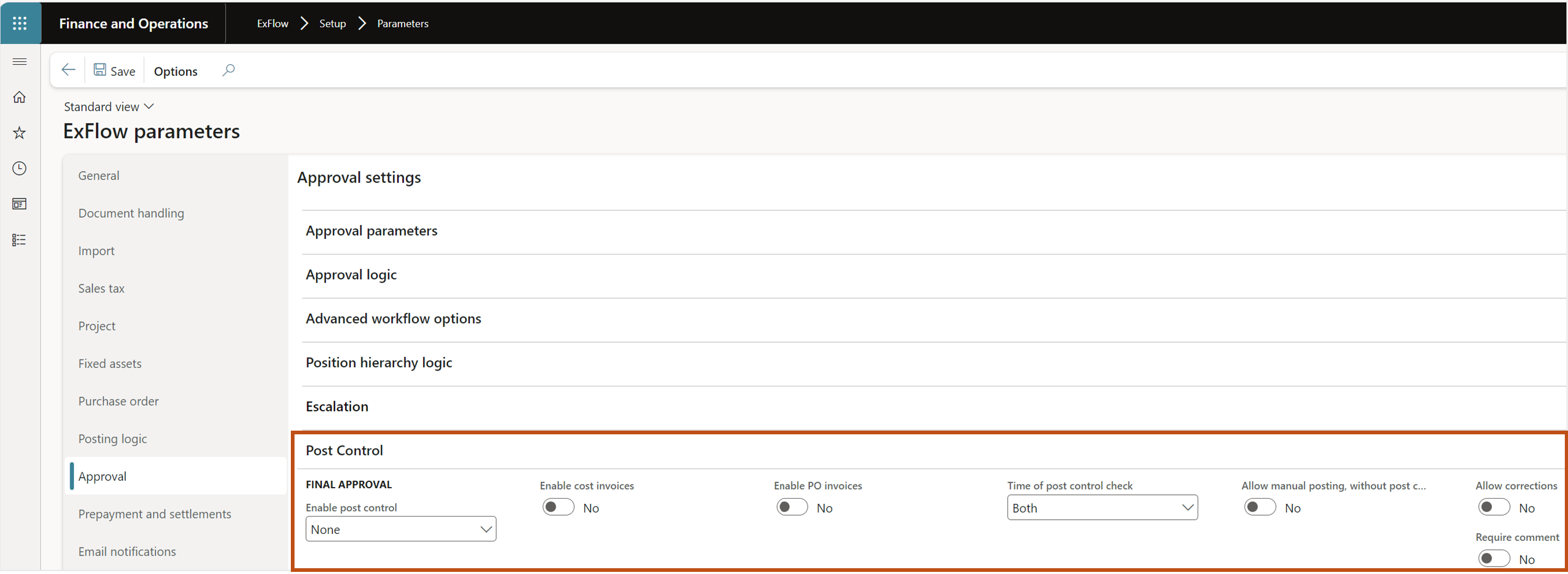
Please Note; If using the Post control functionality, you need to check the section for post control parameters after update to 2.14.0. In the new update there are separate sliders for including cost invoices or invoices connected to purchase order invoices.
See more details in section https://docs.signupsoftware.com/finance-operations/docs/user-manual/post-control/setup-and-work-with-post-control
Before update
After update
Workflows
As part of the release, we have made several changes and added more fields to use in the workflow conditions.
- Purchase Requisition preparer .
- Number of unique approvers.
- Project Contract Id.
- EXF_tDocumentLineApprovers.ApprovedBy, has been added to multiple workflows where it was previously unavailable.
- Approval status from the Purchase Order .
- Number of attachments.
- The field Line reference on line level.
- The remaining inventory dimensions have been added across all workflows.
29411 Summarize lines now in My Vendor Invoices.
We have extended the feature to work with summarize lines to now include availability in My Vendor Invoices.
32916 Balance field in document form
A new balance field has been introduced on the invoice header in the ExFlow Document Form.
32454 invoice images in the payment journal
The capability to view invoice images in the payment journal has been extended to include functionality within centralized payments.
12072 AI flashlight image
The AI flashlight image has been moved to the header pane from the lines, and replaced the image
34288 import charges from Invoice Capture
We have added functionality to import charges from Invoice Capture if they have been interpreted.
See more information about the details for 2.14.0. under "Release notes". https://docs.signupsoftware.com/finance-operations/docs/user-manual/whats-new-and-planned/release-notes