Import invoice creation parameters
Fetch import history line rules
Exflow AP | Setup | Resources | Import invoice creation parameters | Fetch import history line rules
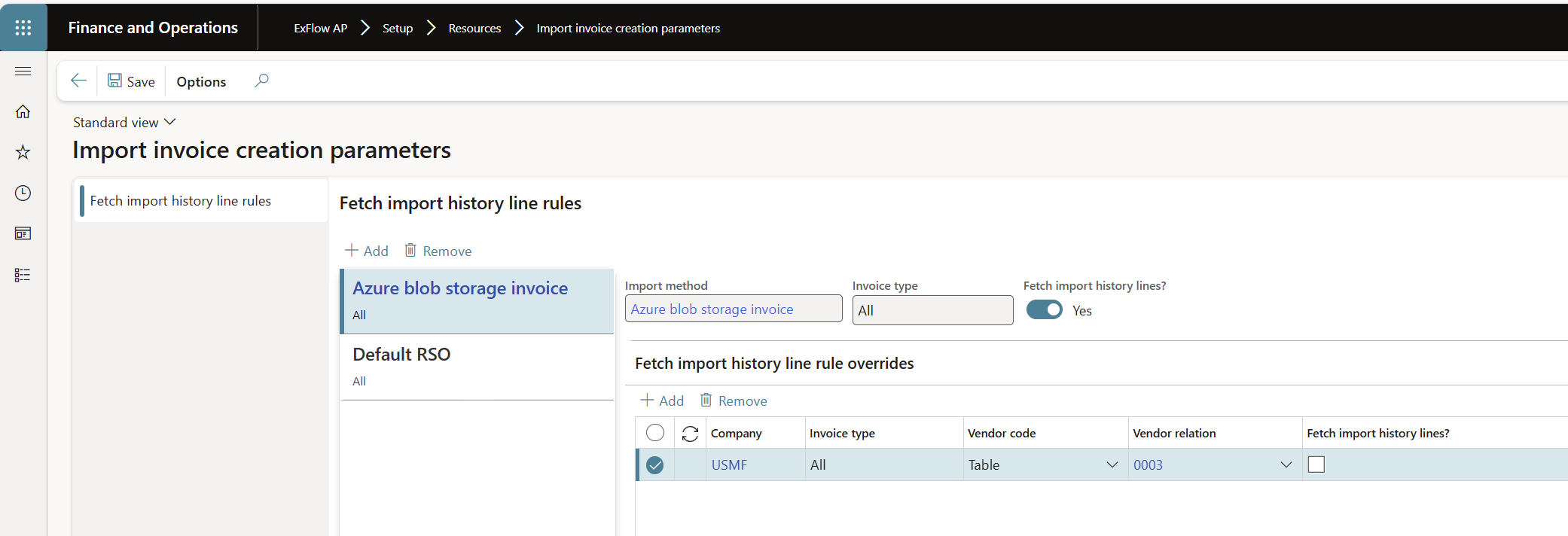
| Fetch import history line rules (Header) | |
|---|---|
| Import method | Specify import method that is used for the setup. |
| Invoice type | Specify invoice type used for setup: All, Cost, Purch. |
| Fetch import history lines | Specify if import history lines will be fetched upon import with the specified import method. |
| Fetch import history line rules overrides (Line) | |
|---|---|
| Company | Select a specific company for override. |
| Invoice type | Specify invoice type used for setup. Setup options: - If Header Invoice type = All, on the lines Invoice type can be All (cost or purch). - If Header Invoice type = Cost, on the lines Invoice type can only be Cost. - If Header Invoice type = Purch, on the lines Invoice type can only be Purch. |
| Vendor code | Choose between All, Table or Group. |
| Vendor relation | Select the specific vendor/group depending on settings in vendor code. |
| Fetch import history lines | Specify if import history lines will be fetched upon import. |
Rule determination logic
The applicable rule is determined based on the combination of Import Method and Invoice Type.
In cases where both “All” and “Cost” invoice types are defined for the same import method, the “Cost” invoice type takes precedence.
If a matching rule is identified, the presence of a rule override is evaluated. Where a rule override exists, the “Fetch import history lines?” value defined in the override is applied.
In the absence of a rule override, the corresponding value from the identified rule header is used.
When no applicable rule is found, import history lines are fetched by default.