ExFlow vendor invoice management (Preview)
ExFlow AP | Workspaces | ExFlow vendor invoice management (Preview)
ExFlow for D365FO is delivered with a workspace named "ExFlow vendor invoice management (Preview)", used for accounts payable members or other personnel working with finance.
The workspace has two different pages, one displaying information from invoices the other displaying an analytical workspace.
The purpose of the changes for the workspace is to help the accounts payable staff to monitoring the invoices in a better and more efficient way.
Instead of using tiles,the vendor invoice management (Preview) workspace is built using "cards", adopting the same layout that is used in the new invoice center from Microsoft. By using cards, you can categorize and group data differently to achieve a better overview of the information you require. This method considerably simplifies viewing all invoice statuses.
And in the invoices section there are now a possibility to use action buttons. This means you may perform specific actions directly in the workspace like "take", "assign to", "release", "post", or "show invoice", without moving to the import or document form.
The purpose is that the AP personnel should be able to only work from the workspace and not need to navigate to import or document form. The preview version is under development for enhancements.
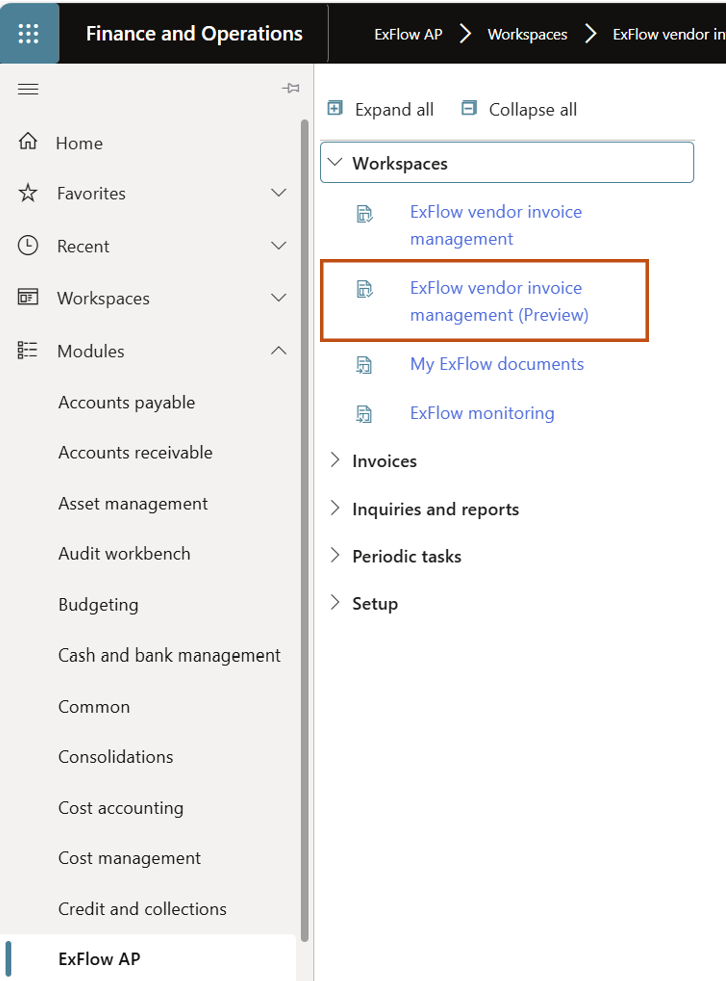
Activation of the new workspace
Enable the new preview functionality from the ExFlow General parameters tab Feature management.
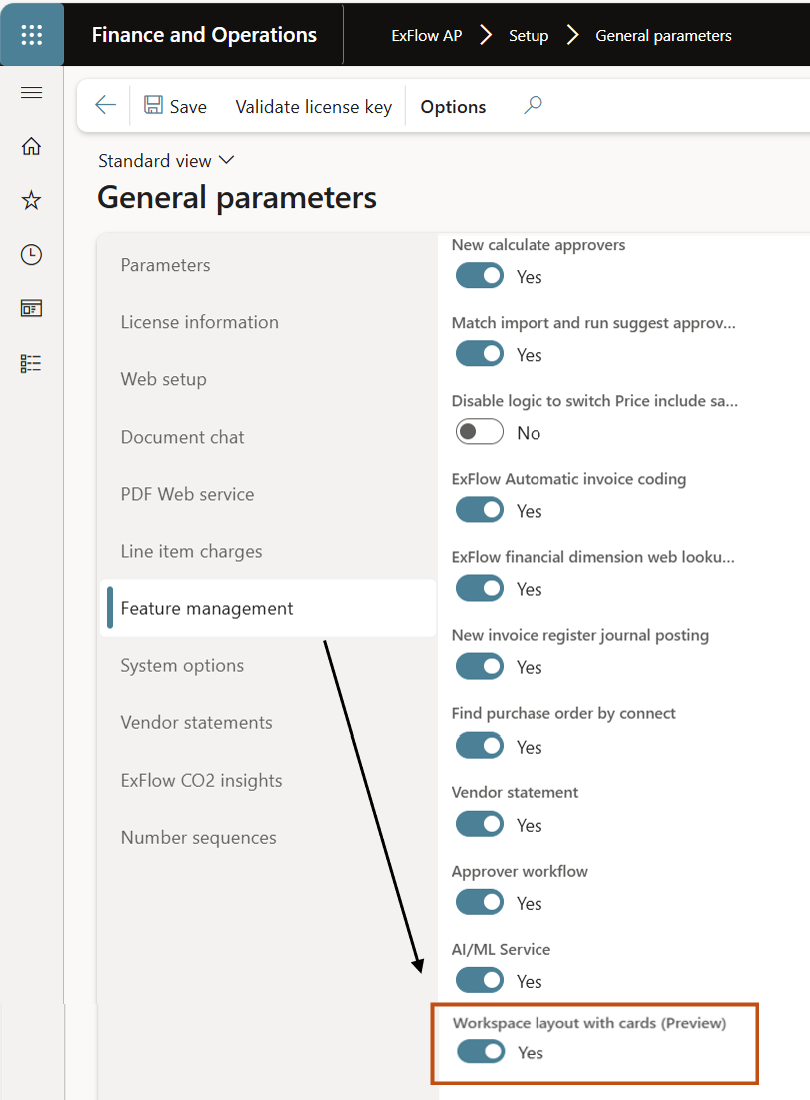
Effected security roles
ExFlow purchase payable admin – full access to the menus and action buttons.
All other ExFlow roles – No access.
Workspace
The cards with numbers are clickable and will open the result based on the filter set on the line.
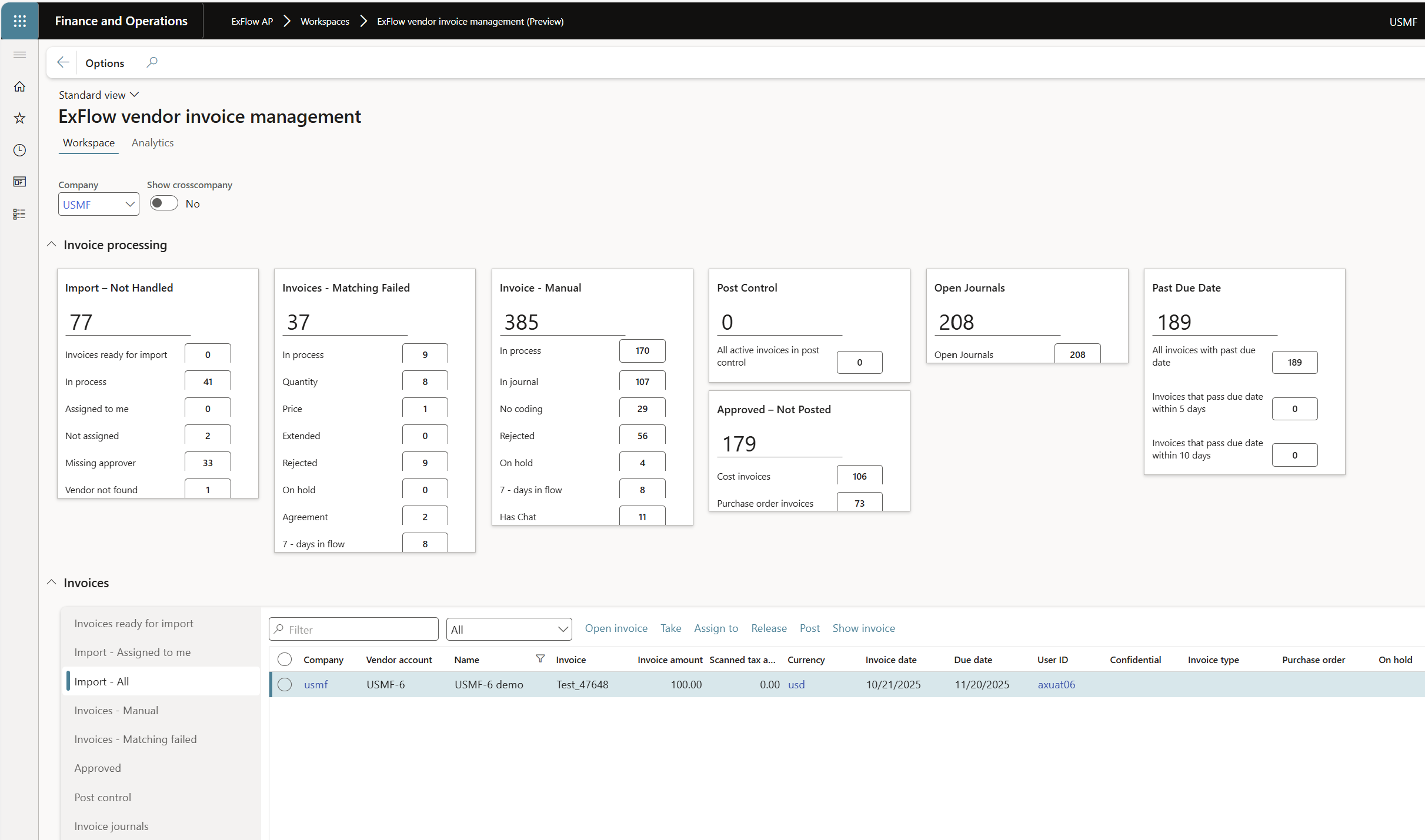
| Workspace | |
|---|---|
| Workspace | Displays various invoices and invoice processing information. |
| Analytics | Displays invoice and approval information in embedded Power BI reports. |
| Company | Filter the tiles for a specific company. |
| Show cross company | Display cross company information in the tiles. |
| Invoice processing: Import - Not Handled | |
|---|---|
| Invoices ready for import | All invoices in import history. |
| In process | All un-posted invoices in import form. |
| Assigned to me | All invoices “assigned to me” in import form. |
| Not assigned | Invoices in import form assigned to no one. |
| Missing approver | Invoices in import form that missing approvers. |
| Vendor not found | Imported invoices without vendors (Vendor not found during import). |
| Invoice processing: Invoices – Matching failed | |
|---|---|
| In process | All active invoices in document form with matching failed status. |
| Quantity | All active invoices in document form with quantity variance. |
| Price | All active invoices in document form with price variance. |
| Extended | All active invoices in document form with extended price variance. |
| Rejected | All invoices in document form with status rejected and are connected to a purchase order or an agreement. |
| On hold | All invoices in the document form with on hold status and are connected to a purchase order or an agreement. |
| Agreement | All active invoices in document form with connection to agreements. |
| 7 –days in flow | All invoices in document form that have been out in the approval flow for more than 7-days, with matching failed status. |
| Invoice processing: Invoices – Manual | |
|---|---|
| In process | All invoices in document form with that is manually handled (cost invoices). No automated process for matching with PO or agreements. |
| In journal | All invoices in document form status “in journal”. |
| No coding | All invoices in document form with no coding/accounting. |
| Rejected | All invoices in document form with status rejected. |
| On hold | All invoices in document form with status on hold. |
| 7 –days in flow | All invoices in document form that have been out in the approval flow for more than 7 days. |
| Has chat | All invoices that have a chat notification. |
| Invoice processing: Post Control | |
|---|---|
| Post control | All active invoices in post control. |
| Invoice processing: Approved – Not posted | |
|---|---|
| Cost invoices | All cost invoices in document form status approved not invoiced. |
| Purchase order invoices | All purchase order invoices in document form status approved not invoice. |
| Invoice processing: Open journals | |
|---|---|
| Open journals | All open invoice approval journals in invoice register and all open invoice journals in direct posting legal entity. |
| Invoice processing: Past due date | |
|---|---|
| All invoices that have passed the due date. | |
| Invoices that pass due date within 5 days. | |
| Invoices that pass due date within 10 days. |
| Invoices | |
|---|---|
| Invoices ready for import | All invoices in import history. |
| Import – Assigned to me | All invoices “assigned to me” in import form. |
| Import - All | All invoices in import form ALL. |
| Invoices - Manual | All invoices under Invoices – Manual tile except 7 – days in flow. |
| Invoices – Matching failed | All invoices under Invoices – Matching failed tile except 7 – days in flow. |
| Approved | All invoices with status “Approved”. |
| Post control | All active invoices in post control form. |
| Invoice journals | All open invoice approval journals in invoice register and all open invoice journals in direct posting legal entity. |